


Are you thinking about using Shopify for your online store? Maybe you want to know if you can change your Shopify plan at any time. Good news! The answer is yes. But, there are some details to understand first. Let's explore everything you need to know.
What Are Shopify Plans?
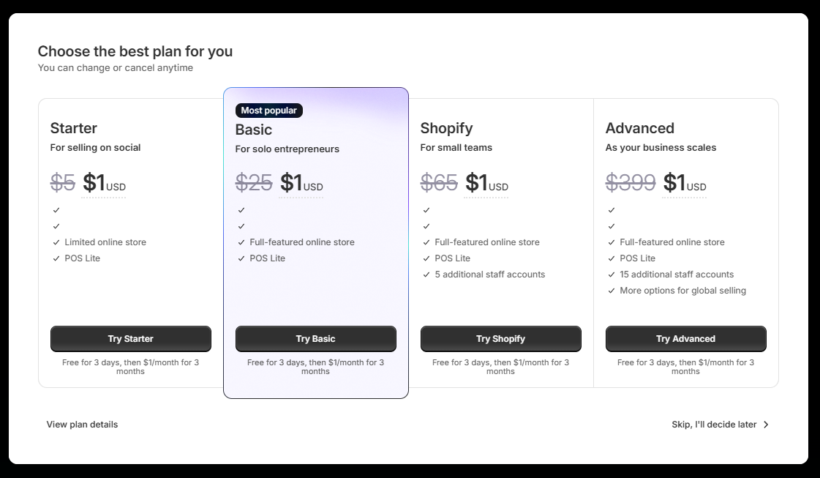
Shopify has different plans. Each plan has its own price and features. You can pick one based on your store size and needs. The plans help you sell products online easily.
Here are some common Shopify plans:
- Basic Shopify: Good for small stores just starting out.
- Shopify: Better for growing stores with more products.
- Advanced Shopify: For big stores that need more tools.
- Shopify Plus: Made for very large businesses.
Each plan has different prices and benefits. You may start with one plan and later want to change it. The question is, can you do it anytime?
Changing Shopify Plans: The Short Answer
Yes, you can change your Shopify plan at any time. Shopify lets you upgrade or downgrade your plan. This means you can move to a higher or lower plan whenever you want.
Upgrading means moving to a plan with more features or higher limits. Downgrading means moving to a cheaper plan with fewer features.
How Does Changing Plans Work?
When you change your Shopify plan, the billing changes too. Shopify bills you every month. If you switch plans in the middle of the month, Shopify adjusts your bill.
For example, if you start with Basic Shopify and after 10 days you upgrade to Shopify plan, Shopify will charge you for the new plan only for the rest of the month.
This way, you pay only for what you use. No need to pay twice for the same time.
Step-by-Step: How to Change Your Shopify Plan
Changing your Shopify plan is simple. Follow these steps:
- Log in to your Shopify admin account.
- Go to Settings at the bottom left corner.
- Click on Plan.
- Here, you will see your current plan details.
- Click on Change plan.
- Choose the new plan you want.
- Review the plan details and price.
- Click Choose this plan to confirm.
That’s it! Your plan will change immediately.

Credit: www.shopify.com
Important Things to Remember When Changing Plans
Even though you can change plans anytime, some things matter:
- Billing Cycle: Shopify bills monthly. Changing plan mid-month adjusts charges.
- Features: Different plans have different features. Downgrading may remove some.
- Apps and Limits: Some plans have limits on staff accounts or shipping discounts.
- Data: Your store data stays safe. Changing plans does not delete products or orders.
What Happens if You Upgrade Your Plan?
When you upgrade, you get more features and more limits. For example, more staff accounts or better shipping rates.
Upgrading is great if your store grows fast. You get tools to help sell more.
Your billing will increase to the new plan price after your change.
What Happens if You Downgrade Your Plan?
Downgrading means moving to a cheaper plan. You get fewer features or limits.
Be careful if you have many staff accounts or use special features. Some may not work after downgrading.
Shopify will tell you if your current setup does not fit the new plan.
Can You Pause Your Shopify Plan?
Sometimes, you may want to pause your store instead of changing plans. Shopify offers a pause plan option.
Pausing lets you keep your store but stop selling temporarily. You pay a small fee instead of the full plan price.
This is good if you want a break but don’t want to lose your store.
Credit: barn2.com
Why Change Shopify Plans?
There are many reasons to change plans. Here are a few:
- Your store grows and needs more features.
- You want to save money by moving to a cheaper plan.
- You want better shipping or payment options.
- You want to add more staff members.
- You want to try a different plan before deciding.
Shopify Plan Comparison Table
Here is a simple table to compare plans:
| Plan | Monthly Price (USD) | Staff Accounts | Shipping Discounts | Features |
|---|---|---|---|---|
| Basic Shopify | $39 | 2 | Up to 77% | Basic reports, Online store |
| Shopify | $105 | 5 | Up to 88% | Professional reports, Gift cards |
| Advanced Shopify | $399 | 15 | Up to 88% | Advanced reports, Third-party shipping rates |
| Shopify Plus | Custom Price | Unlimited | Best rates | Enterprise features |
Tips for Choosing the Right Plan
Choosing the right plan is important. Here are some tips:
- Start small if you are new.
- Upgrade when you need more tools.
- Check your sales and traffic numbers.
- Think about your budget.
- Try out features on a plan before moving up.
Can You Cancel Your Shopify Plan?
Yes, you can cancel your Shopify plan anytime. But if you cancel, your store will close.
Make sure to save your data before canceling. You can always start a new store later.
Summary: Can You Change Shopify Plan Anytime?
In short:
- You can change Shopify plans anytime.
- Upgrades and downgrades work instantly.
- You pay only for what you use each month.
- Check features before downgrading.
- Pause option is available if needed.
- Cancelling closes your store.
Shopify is flexible. It lets you grow your store at your own pace.
Final Thoughts
Changing your Shopify plan is easy. No need to worry about fixed contracts.
Choose the plan that fits your store today. Change it tomorrow if you want.
Shopify is made to help you sell online without stress.
Now you know you can change your Shopify plan at any time. Go ahead and pick the best plan for you!
Frequently Asked Questions
Can I Change My Shopify Plan Anytime?
Yes, Shopify lets you switch plans whenever you want without penalties.
Will I Lose Data When Changing Shopify Plans?
No, your store data stays safe when you change plans.
Does Shopify Charge Fees For Downgrading Plans?
Shopify usually does not charge extra fees for downgrades.
How Does Billing Work When I Upgrade My Shopify Plan?
You pay the new plan price immediately, and billing adjusts automatically.

 Ecommerce Guides offers extensive tips, tricks, and latest hacks for your ecommerce journey. If you don't have the time to do it yourself, contact Ivan for help!
No comments
Post a Comment